 Add to Chrome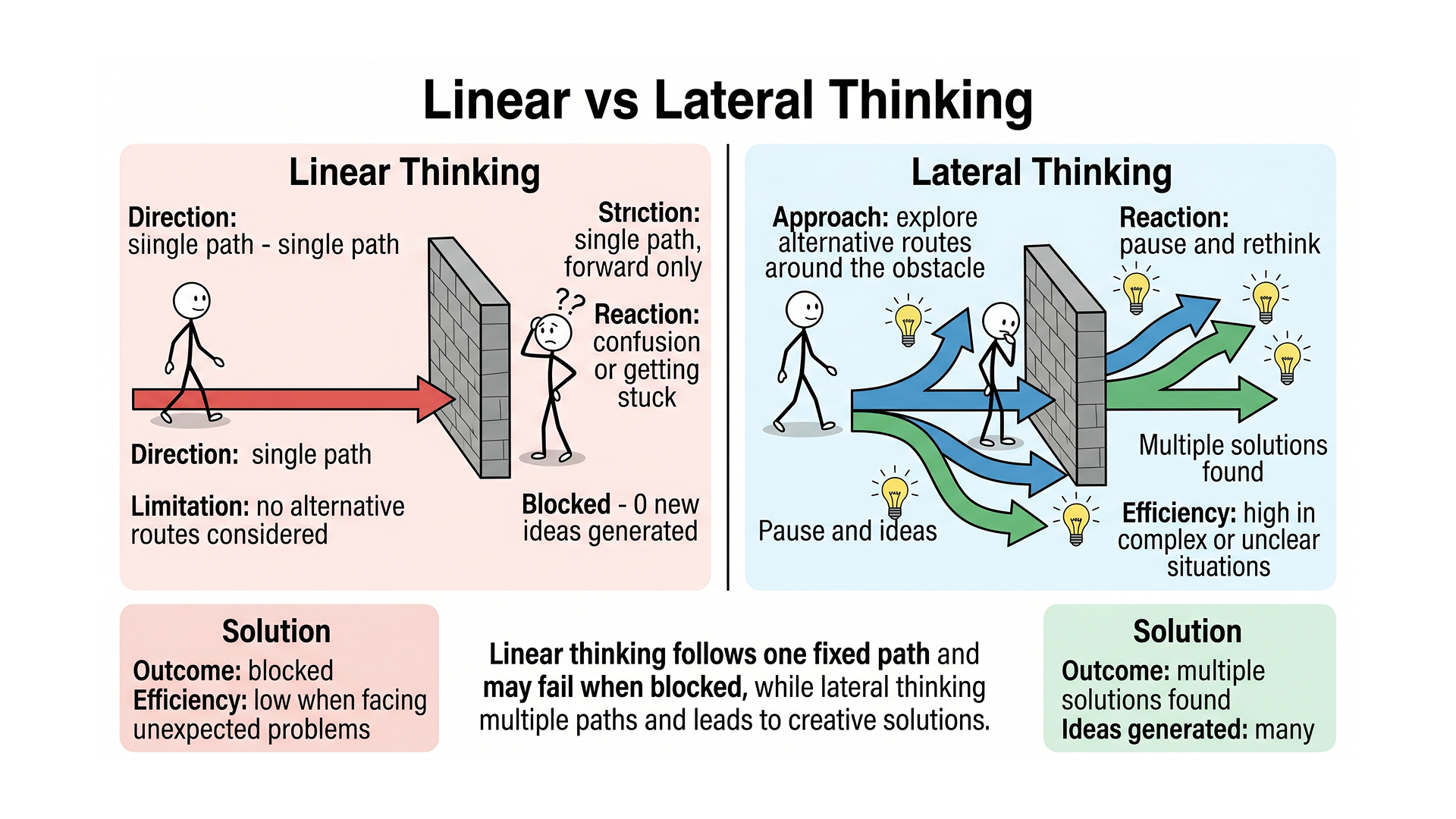
TL;DR: Master Lateral Thinking
- Lateral thinking is a problem-solving strategy that uses non-linear, creative approaches rather than step-by-step logic.
- Key techniques like Random Entry and Provocation (PO) force the brain out of established neural pathways.
- Unlike vertical thinking (which is about being right at every step), lateral thinking is about being effective by changing the frame.
- Designers use lateral thinking to break creative blocks, often by importing diverse visual stimulus via tools like Figscreen.
Introduction: Why Your Logical Brain Is Slowing You Down
According to a major IBM Global CEO Study, over 60% of executives rank creativity as the single most important leadership quality for navigating an increasingly complex world. Yet, most of us are trained exclusively in “vertical thinking” (the standard, logical, step-by-step approach we learned in school). Logic is excellent for refining ideas, but it is remarkably poor at generating them.
If you find yourself stuck on a design layout or a product roadmap, you do not need more logic. You need to think sideways. In this guide, I will break down 10 lateral thinking techniques that will help you solve problems faster and bypass the mental ruts that kill innovation. We will also look at how tools like what is a figma plugin can facilitate these creative leaps by bringing external data into your workspace.
1. Random Entry (Random Word Generation)
Lateral thinking via Random Entry involves picking a completely unrelated word or object and forcing a connection to your current problem. This technique works because the brain is an associative machine (it cannot help but create links between two disparate concepts).
If you are designing a new checkout flow and you get stuck, pick a random object, like a “corkscrew.” How is a checkout flow like a corkscrew? Perhaps it needs to be “twisted” to take up less vertical space, or it should “pull” the user through the process with a mechanical advantage. This forced association breaks your brain out of its standard “shopping cart” mental model.
Try this: Open a dictionary to a random page, pick the first noun you see, and write down five ways it relates to your project.]
2. Provocation and Movement (The ‘PO’ Technique)
The Provocation technique (often abbreviated as PO) involves making a statement that is intentionally impossible or ridiculous to shock your brain into new territories. You create a “provocation,” and then use “movement” to find a functional idea hidden within that absurdity.
For example, if you are trying to improve a website’s navigation, a provocation might be: “PO: The website has no navigation menu.” At first, this seems useless. But by moving from that idea, you might realize that a truly intuitive site might rely on a powerful AI-driven search bar or a conversational interface, leading to a much cleaner ux audit of your current clutter.
3. Reversal (The Problem Flip)
Reversal is the process of taking a problem and looking at its opposite to find a solution. Instead of asking “How can I make this app more engaging?”, ask “How could I make this app as boring and difficult as possible?”
By listing the ways to ruin the user experience, you identify the core pain points you must avoid. This often reveals that your current “engagement” features are actually causing friction. If you are doing a competitive analysis, use reversal to see what your competitors are doing wrong. You can quickly pull their live sites into your workspace with a figma screenshot plugin to analyze these “anti-patterns” side-by-side.
4. Fractionation
Fractionation is the lateral thinking technique of breaking a problem down into its smallest components and then rearranging them in a new order. We often view problems as monolithic blocks. Fractionation peels back the layers.
If you are building a landing page, do not think of it as a “page.” Think of it as: a headline, a call to action, a trust signal, and a visual hero. Now, ask yourself: What happens if the trust signal comes before the headline? What if the CTA is the hero? This shuffling often unearths layouts that logic would have ignored. Using a wireframe plugin in figma can help you rapidly test these fractured layouts.
5. Analogical Thinking
Analogical thinking requires you to find a parallel problem in a completely different industry and copy its solution. This is the “How would Disney solve this?” or “How would a heart surgeon handle this?” approach.
If you are struggling with a complex design system, look at how LEGO manages its brick inventory. The logic LEGO uses for modularity can be directly applied to your Figma components. Many designers find that seeing how other industries handle visual data is the best way to innovate. You can gather these real-world examples by knowing how to use icon plugin in figma or by capturing live web examples directly.
| Technique | Goal | Best Used For |
|---|---|---|
| Random Entry | Break mental ruts | Early-stage brainstorming |
| Reversal | Identify friction | UX audits and debugging |
| Fractionation | Reorganize structures | Layout and architecture |
| Analogical | Cross-industry innovation | Strategic pivots |
6. The “Why” Chain (Alternative Search)
The Why Chain in lateral thinking is about finding the “concept” behind a solution rather than just the solution itself. While the “5 Whys” is used for root cause analysis, the lateral Why Chain is used to find alternatives.
Ask: “Why am I using a hamburger menu?” Answer: “To hide secondary links.” Now, ask: “What are other ways to hide secondary links?” This leads you to progressive disclosure, tab bars, or even voice commands. It prevents you from getting married to your first idea. This is essential when you are learning how to use anima plugin in figma or similar tools where technical constraints might limit your first choice.
7. Escapism (Removing Constraints)
Escapism involves identifying a “rule” or “fact” about your problem and temporarily pretending it does not exist. We are often limited by what we think is possible (budget, technology, or time).
Identify a constraint: “This site must load in under 2 seconds.” Now, escape it: “What if loading time didn’t matter?” You might realize that you want a highly immersive, video-heavy experience. While you eventually have to deal with the 2-second constraint, the “escapist” version might inspire a lightweight way to achieve that same immersive feeling using optimized assets or a mockup plugin figma.
8. Challenging Assumptions
This technique requires you to list every assumption you have about a project and systematically challenge them. Every project has “sacred cows” (things everyone assumes to be true).
Common design assumptions include: “The logo must be in the top left” or “Users scroll down.” By challenging these, you open the door to unique navigation patterns. When you perform a competitive analysis UX guide review, look for which competitors are successfully breaking these assumptions. Use Figscreen to grab those examples so you can study their exact implementation without leaving Figma.
9. The Six Thinking Hats (Applied Laterally)
While often used for meetings, the Six Thinking Hats technique is a lateral tool that forces you to change your cognitive ‘mode’ on demand.
- White Hat: Data and facts.
- Red Hat: Emotions and gut feelings.
- Black Hat: Risks and pitfalls.
- Yellow Hat: Benefits and optimism.
- Green Hat: Creative possibilities.
- Blue Hat: Management of the process.
By intentionally putting on the “Green Hat,” you give yourself permission to be irrational. If you are stuck, switch to the “Red Hat” and ask: “How does this design make me feel?” Often, the emotional reaction points to the lateral solution that logic missed.
10. Visual Iteration (Mood Boarding)
Visual iteration uses existing visual data to trigger new ideas through a process of ‘visual synthesis’. For designers, lateral thinking often happens when we see two unrelated UI elements next to each other.
This is why mood boarding is so effective. By pulling in disparate screenshots (using a figma screenshot plugin) from high-end fashion sites, brutalist architecture blogs, and fintech apps, your brain starts to synthesize a new visual language. You aren’t just copying; you are using the lateral connections between these sources to create something original. Knowing how to use figma to html plugin or how to use figma to webflow plugin helps bridge the gap between these visual inspirations and the final build.
What Is the Difference Between Lateral and Vertical Thinking?
Vertical thinking is analytical and moves in a straight line toward a single correct answer, whereas lateral thinking is provocative and moves sideways to find multiple possibilities.
Vertical thinking says: “I will find the best way to climb this ladder.” Lateral thinking says: “Do I even need a ladder, or can I just move the floor?” In the world of UX and product design, vertical thinking is best for refining a feature (A/B testing), while lateral thinking is best for inventing a feature (zero-to-one product design). If you are struggling with how to publish a figma plugin, you need vertical thinking. If you are wondering what plugin to build, you need lateral thinking.
How to Improve Your Lateral Thinking Every Day
Improving lateral thinking is like training a muscle. You must intentionally put yourself in “brain-bending” situations. One of the best ways is to expand your visual library. Instead of staying inside the Figma bubble, look at live websites. Use Figscreen to capture batch URLs (up to 25 at a time) of sites that have nothing to do with your industry.
By seeing how a Japanese luxury brand handles typography compared to a German logistics firm, you force your brain to make new associations. You can also practice by explaining your design problems to someone outside your field. Their “naive” questions are often the best lateral provocations you will ever receive.
FAQ: Frequently Asked Questions About Lateral Thinking
Q: Is lateral thinking the same as brainstorming?
A: Not exactly. Brainstorming is a group activity aimed at generating many ideas. Lateral thinking is a specific cognitive process (which can be done alone) that uses structured techniques like PO or Reversal to change the thinker’s perspective.
Q: Can anyone learn lateral thinking, or is it an innate talent?
A: It is a skill that can be learned. While some people are naturally more divergent thinkers, the techniques developed by Edward de Bono provide a formal framework that anyone can use to achieve creative results.
Q: How do I know when to stop lateral thinking and start vertical thinking?
A: Lateral thinking is for the “generative” phase of a project. Once you have a unique and effective idea, switch to vertical thinking to refine, test, and implement it. Use lateral thinking to find the door and vertical thinking to walk through it.
Conclusion: Stop Digging the Same Hole
As Edward de Bono famously said, “You cannot dig a hole in a different place by digging the same hole deeper.” If your current design or business strategy is not working, more of the same logic will not save it. You need to stop, step back, and apply one of these 10 lateral thinking techniques to find a new path.
Whether you are performing a competitive analysis UX guide review or building a new design system, the goal is to see what others miss.
Next Step: Want to fuel your lateral thinking with real-world inspiration? Install Figscreen today and start capturing live web pages directly into your Figma canvas. Sometimes, the best way to think sideways is to see how the rest of the world is doing it.